
Skip to content

How to setup IPTV on Smart TV via Smart IPTV App(SIPTV)?

By Harold Anderson
2 min read
IPTV smarters pro

IPTV is a service which delivers the television channels through the logical Internet protocol (IP) instead of traditional methods such satellite and cable televisions.With the help of this application, no matter what brand of Smart TV you are using this app works on all Smart TVs such as LG, Samsung, and Sony. You can play your IPTV streams on your Smart TV.This application also supports EPG as well as Picons and grouping. In order to have EPG, Picons and Channel groups, the M3U file or URL that you are uploading to this application, Must be m3u with options.

Note: Samsung has discontinued the use of the SIPTV app from the Samsung Apps store.
How to install the SIPTV app on your Samsung TV?

How to add IPTV channels to SIPTV (Smart IPTV App)

Step 1: Start by downloading the Smart IPTV App from the store.
Please note: For the beginning, the App offers you a 7-day free trial. After the App expires, you can obtain it again via in-App microtransaction or visit the website and purchasing the license.

Step 2: After opening the application and you will see your TV Mac address.
Write it down to prepare for the next step.
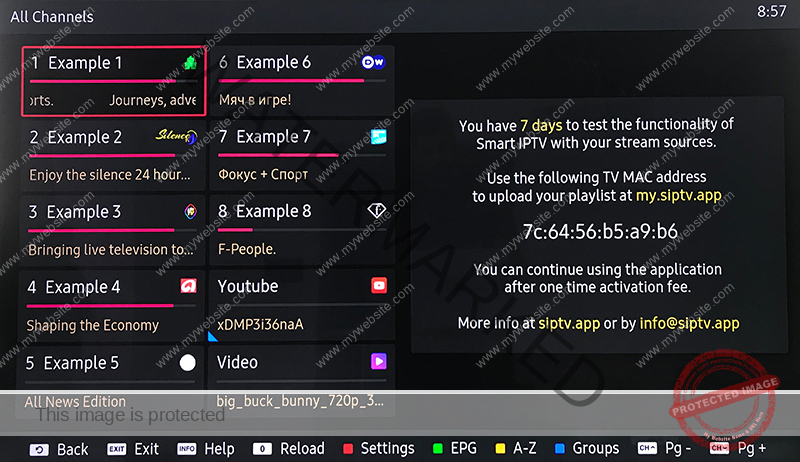
smart iptv

Step 3: Open the playlist uploader web page by opening this URL http://siptv.eu/mylist/
Place your TV Mac address and the M3U URL you received from your IPTV provider, mark “Keep Online” and press “Add Link“.
Better to add M3U link and do not use the Static M3U file to have all new updates.

Note: The progressive IPTV providers give you a dashboard which you can generate and access your M3U url in dashboard.

smart iptv

Step 4: After uploading your playlist successfully, restart the Smart IPTV application and the channels will be displayed.

Enjoy!

How to Troubleshoot SIPTV app?

Password for adult content

For unlocking adult content on your Smart TV application you can try 0000, 1234, or 1122.

Let us know in the comments section below about your opinion and feedback concerning this article and help us improve the quality of our articles. Thank you in advance.


Written by

Harold Anderson

I’m Harold Anderson, a technology writer and digital media enthusiast with a strong focus on IPTV, online streaming platforms, and modern entertainment technologies. Over the years, I’ve closely followed how internet-based television has evolved, from basic live streams to advanced on-demand and multi-device viewing experiences. At RevoIPTV, I share my knowledge to help readers understand how IPTV works, how to choose reliable services, and how to get the best performance from their streaming setup. My goal is to make complex technical topics simple, clear, and practical—whether you’re new to IPTV or already familiar with streaming technology. I believe IPTV represents the future of television, offering flexibility, global content access, and a better overall viewing experience compared to traditional cable or satellite TV.

View profile

6 responses on “How to setup IPTV on Smart TV via Smart IPTV App(SIPTV)?”

Join the conversation

Share your ideas and tips with the community.

Read next

28 January 2024

What is IPTV?

IPTV stands for Internet Protocol Television.  This new low-cost technology is superseding the traditional satellite and cable subscription for many users around the world. IPTV, the abbreviation of Internet Protocol Television, is a service which delivers the television channels through the logical Internet protocol (IP) instead of traditional methods such satellite and cable televisions. Such, service can … Read more
Read article 4 min read
28 January 2024

What is MAG?

Infomir’s MAG is one the common IPTV devices in the world. After 2007, Infomir produces Set-Top Boxes following the brand name MAG. These Set-Top Boxes are multi-functional devices that allow you to quickly organize your media contents and use IPTV services.How to setup IPTV on MAG?  Below are some of the major features represented in … Read more
Read article 1 min read
MAG boxes are some of the most powerful streaming media players. IPTV users choose them for their speed, simplicity, and excellent streaming performance. The user interface is simple and responsive, channel switching is quick and you receive all the features required to get the most out of your IPTV service. How to setup IPTV on a MAG device? These Set-Top Boxes are … Read more
Read article 2 min read
WhatsApp