
How to change channel’s audio on VLC?
Sometimes the channels you watch on VLC media player has multiple audio channels. For example, all Nordic channels have multiple audio languages and you can select any language from the list. How to watch IPTV on VLC?
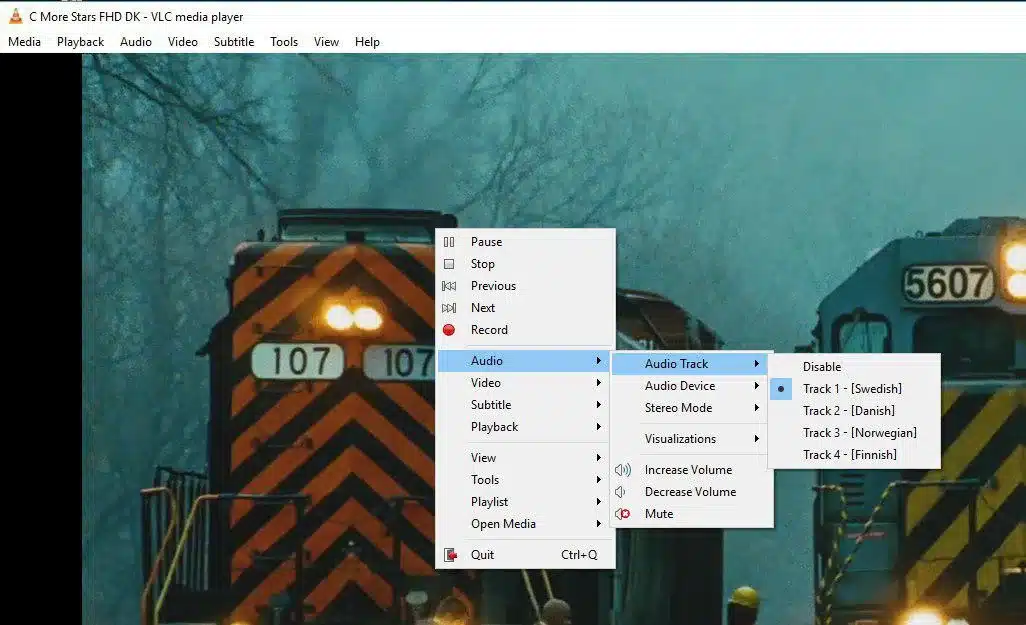
How to change audio channel
In order to change the audio channel, you must “Right click” on the middle of the screen and select “Audio” and then “Audio Track” as depicted in the above picture. Here you can select the language you want and the audio channel will change.
If you think we missed out on anything else, feel free to discuss it with us in the comments section down below. Thank you.
Join the conversation
Read next

28 January 2024
What is IPTV?
IPTV stands for Internet Protocol Television. This new low-cost technology is superseding the traditional satellite and cable subscription for many users around the world. IPTV, the abbreviation of Internet Protocol Television, is a service which delivers the television channels through the logical Internet protocol (IP) instead of traditional methods such satellite and cable televisions. Such, service can … Read more
Read article
4 min read
28 January 2024
What is MAG?
Infomir’s MAG is one the common IPTV devices in the world. After 2007, Infomir produces Set-Top Boxes following the brand name MAG. These Set-Top Boxes are multi-functional devices that allow you to quickly organize your media contents and use IPTV services.How to setup IPTV on MAG? Below are some of the major features represented in … Read more
Read article
1 min read
28 January 2024
How to record IPTV on MAG Box?
MAG boxes are some of the most powerful streaming media players. IPTV users choose them for their speed, simplicity, and excellent streaming performance. The user interface is simple and responsive, channel switching is quick and you receive all the features required to get the most out of your IPTV service. How to setup IPTV on a MAG device? These Set-Top Boxes are … Read more
Read article
2 min read
1 response on “How to change channel’s audio on VLC?”